Redux 基础与实现
1. 学习资源
- Redux 官方文档: Redux Documentation
- Redux 源码: GitHub Repository
- 本章节代码仓库:
redux-nut(包含 Redux、React-Redux、中间件等实现)
2. Reducer 的概念
2.1 名字由来:与 Array.prototype.reduce 的关系
reducer 的命名来源于数组的 reduce 方法。reduce 方法接收一个函数作为累加器,该函数(回调)就是一种 "reducer"。
示例:使用 reduce 求数组和
一个常见的面试题:计算数组 [1, 2, 3, 4] 的和。
传统的 for 循环思路可以抽象为 reduce 的过程:
- 取一个初始值(如
0或数组第一个元素)。 - 遍历数组,将 "上一次的结果" 与 "当前元素" 相加,得到 "新的结果"。
- 重复此过程,直到遍历完成。
这个过程中的核心累加函数,其模式就是 (accumulator, currentValue) => newAccumulator。这正是 reducer 函数名的由来。
// 定义一个 reducer 函数
const sumReducer = (accumulator, currentValue) => accumulator + currentValue;

const arr = [1, 2, 3, 4];

// 1. 不设置初始值,accumulator 默认为数组的第一个元素(1)
// 计算过程: (((1 + 2) + 3) + 4) = 10
const sum1 = arr.reduce(sumReducer);
console.log(sum1); // 输出: 10

// 2. 设置初始值为 5
// 计算过程: ((((5 + 1) + 2) + 3) + 4) = 15
const sum2 = arr.reduce(sumReducer, 5);
console.log(sum2); // 输出: 15
2.2 Reducer 的定义与特点
在 Redux 中,Reducer 是一个函数,其签名(格式)如下:
(previousState, action) => newState核心特点:Reducer 必须是纯函数 (Pure Function)。
- 纯函数:对于相同的输入,永远产生相同的输出,并且没有任何可观察的副作用。
- 保持纯净很重要:纯函数是可信赖的、行为可预测的。
哪些行为会破坏函数的纯净性(应避免在 Reducer 中使用)?
- 修改传入的参数:如直接修改
state或action对象。 - 执行有副作用的操作:如发起 API 请求、进行路由跳转。
- 调用非纯函数:如
Date.now()或Math.random(),因为它们的返回值不是每次都固定的。
3. Redux 是什么?
3.1 核心定义
Redux 是一个用于 JavaScript 应用 的可预测的状态容器。
- 不仅限于 React: Redux 是用纯 JS 编写的,可以与任何 UI 框架(如 Vue, Angular)或原生 JS 结合使用。
- 状态容器: 当多个组件需要共享和操作同一份状态时,将这份状态从组件中抽离出来,由一个统一的、独立于组件的 "容器" (Store) 来管理,可以简化组件间的通信和状态管理。
- 可预测性: 通过使用纯函数 (Reducer) 来处理状态变更,保证了程序行为的一致性和易于测试。
3.2 Redux 工作流程
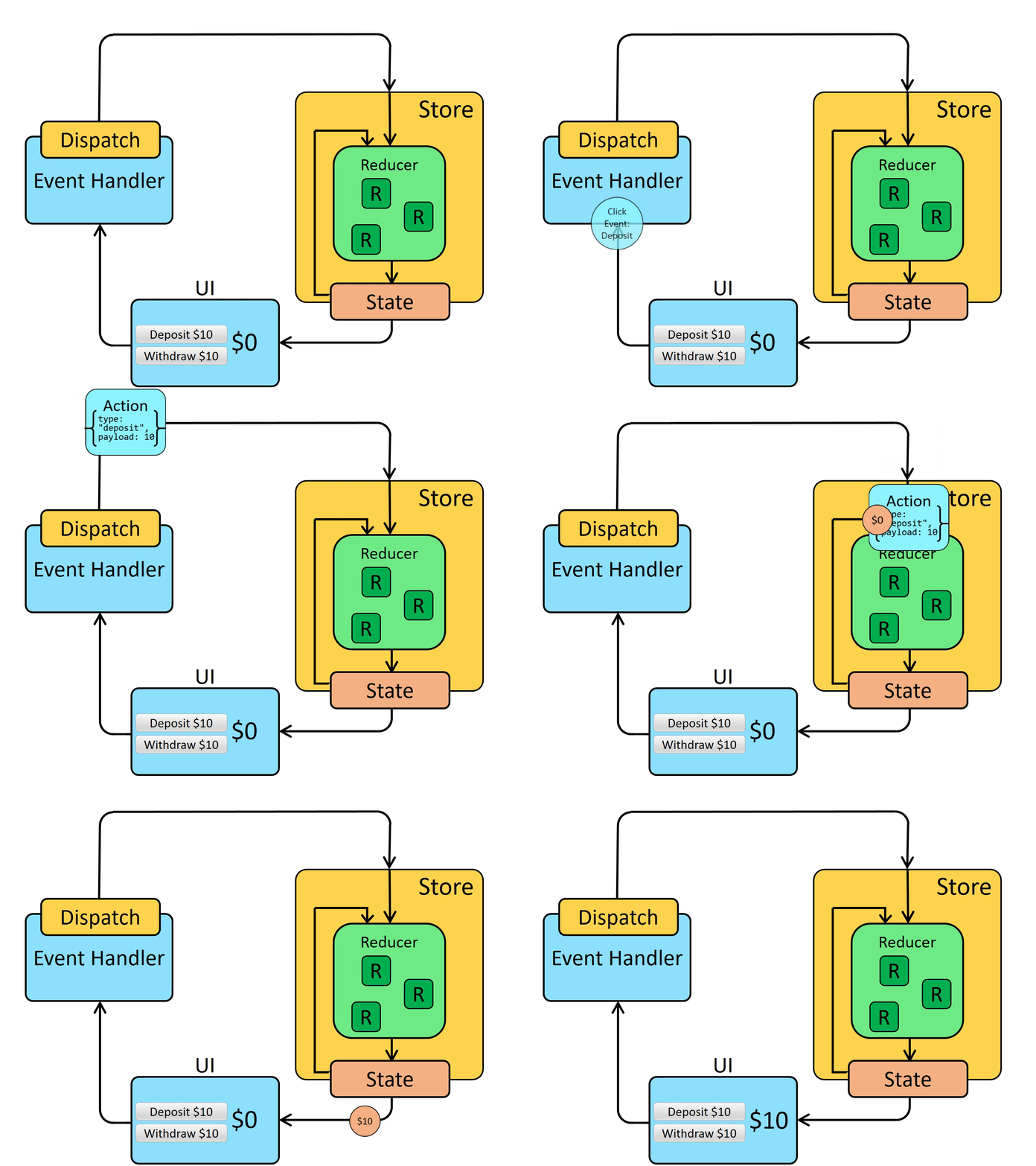
- Store: 整个应用的唯一状态树都存储在一个对象中,这个对象被称为 Store。
- Component (UI):
- 通过
store.getState()获取 Store 中的状态(State)来渲染 UI。 - 当用户进行操作时,组件不能直接修改 State。
- 通过
- Dispatch & Action:
- 组件通过调用
store.dispatch(action)来表达修改状态的意图。 action是一个普通的 JavaScript 对象,必须包含一个type字段来描述发生了什么。
- 组件通过调用
- Reducer:
- Store 接收到
action后,会将其和当前的state一起传递给reducer函数。 - Reducer 根据
action.type来计算出新的 State 并返回。
- Store 接收到
- State 更新与 UI 重新渲染:
- Store 会用 Reducer 返回的新 State 替换掉旧的 State。
- 通过
store.subscribe(listener)注册的监听函数会被触发,我们可以在监听函数中通知 UI 进行重新渲染。
4. Redux 基本用法
4.1 创建 Store
首先,需要定义一个 reducer,然后使用 createStore API 创建 store。
// src/store/index.js
import { createStore } from 'redux';

// 初始状态
const initialState = { count: 0 };

// 定义一个 Reducer
function countReducer(state = initialState, action) {
  switch (action.type) {
    case 'ADD':
      return { ...state, count: state.count + 1 };
    case 'MINUS':
      return { ...state, count: state.count - 1 };
    default:
      return state;
  }
}

// 创建 Store
const store = createStore(countReducer);

export default store;
4.2 在组件中使用 Store
在 React 组件中,我们可以导入 store 并使用它的 API。
// src/App.js
import React, { Component } from 'react';
import store from './store';

export default class App extends Component {
  add = () => {
    // 通过 dispatch 发送 action 来更新状态
    store.dispatch({ type: 'ADD' });
  };

  minus = () => {
    store.dispatch({ type: 'MINUS' });
  };

  render() {
    // 通过 getState 获取当前状态
    const count = store.getState().count;

    return (
      <div>
        <p>Count: {count}</p>
        <button onClick={this.add}>ADD</button>
        <button onClick={this.minus}>MINUS</button>
      </div>
    );
  }
}问题: 此时点击按钮,你会发现 console.log(store.getState()) 的值确实改变了,但页面 UI 没有更新。这是因为 Redux 作为一个独立的状态库,它状态的改变不会自动通知 React 组件进行重渲染。
4.3 订阅与更新
为了让组件在 store 状态变化时重新渲染,需要使用 store.subscribe() 方法。
store.subscribe(listener): 注册一个监听函数listener。每当dispatch一个 action 导致 state 变化时,这个listener就会被执行。subscribe方法会返回一个unsubscribe函数,用于取消订阅。
// src/App.js
import React, { Component } from 'react';
import store from './store';

export default class App extends Component {
  componentDidMount() {
    // 订阅 state 变化,当 state 变化时,强制更新组件
    this.unsubscribe = store.subscribe(() => {
      this.forceUpdate(); // 或者使用 setState({})
    });
  }

  componentWillUnmount() {
    // 组件卸载时,取消订阅,防止内存泄漏
    if (this.unsubscribe) {
      this.unsubscribe();
    }
  }

  add = () => {
    store.dispatch({ type: 'ADD' });
  };

  minus = () => {
    store.dispatch({ type: 'MINUS' });
  };

  render() {
    const count = store.getState().count;
    return (
      <div>
        <p>Count: {count}</p>
        <button onClick={this.add}>ADD</button>
        <button onClick={this.minus}>MINUS</button>
      </div>
    );
  }
}
现在,点击按钮,UI 就能正确更新了。
5. 从零实现 Redux 核心 API:createStore
Redux 的核心非常精简,我们可以自己实现一个简版的 createStore 来加深理解。
5.1 目标 API
createStore(reducer) 函数执行后,需要返回一个 store 对象,该对象包含以下方法:
getState(): 返回当前的 state。dispatch(action): 分发 action,触发 state 更新。subscribe(listener): 订阅 state 变化。
5.2 代码实现
// src/redux-nut/createStore.js

export function createStore(reducer) {
  let currentState = undefined;
  const listeners = [];

  // 返回当前 state
  function getState() {
    return currentState;
  }

  // 分发 action
  function dispatch(action) {
    // 调用 reducer,传入当前 state 和 action,计算出新的 state
    currentState = reducer(currentState, action);
    // 依次调用所有订阅的监听函数
    listeners.forEach(listener => listener());
  }

  // 订阅 state 变化
  function subscribe(listener) {
    // 将监听函数添加到数组中
    listeners.push(listener);

    // 返回一个 unsubscribe 函数
    return function unsubscribe() {
      // 找到该监听函数在数组中的位置
      const index = listeners.indexOf(listener);
      if (index > -1) {
        // 从数组中移除该监听函数
        listeners.splice(index, 1);
      }
    };
  }

  // 初始化 state:
  // Redux 内部会 dispatch 一个特殊 type 的 action,
  // 以便让 reducer 返回其初始 state。
  dispatch({ type: '@@REDUX/INIT' + Math.random() });

  return {
    getState,
    dispatch,
    subscribe
  };
}
6. Redux 与异步:中间件简介
6.1 异步操作的挑战
标准的 Redux dispatch 只能处理纯对象(Plain Object) 形式的 action。
同步操作(正常)
store.dispatch({ type: 'ADD' });异步操作(会报错) 假设我们想在1秒后执行减法操作。如果直接向 dispatch 传入一个函数,Redux 会报错。
const asyncMinus = () => {
  setTimeout(() => {
    // 这种写法是可行的,因为 dispatch 最终接收的还是一个对象
    store.dispatch({ type: 'MINUS' });
  }, 1000);
}

// 但如果我们想让 dispatch 本身能处理更复杂的逻辑,比如一个函数
const thunkAction = (dispatch) => {
  setTimeout(() => {
    dispatch({ type: 'MINUS' });
  }, 1000);
};

// 下面的调用会报错: "Actions must be plain objects. Use custom middleware for async actions."
store.dispatch(thunkAction);
6.2 中间件的作用
为了解决上述问题,Redux 引入了**中间件(Middleware)**的概念。
- 定义: 中间件提供了一个位于 "发起 action" 到 "action 到达 reducer" 之间的扩展点。
- 作用: 它可以让你包装
dispatch方法,从而实现日志记录、错误报告、异步 API 调用等功能。 - 常用中间件:
redux-thunk: 允许你dispatch一个函数,这个函数可以接收dispatch和getState作为参数,非常适合处理简单的异步逻辑。redux-saga: 通过 Generator 函数来处理更复杂的副作用,提供了更强大的异步控制流。
通过使用中间件,我们可以增强 dispatch 的能力,使其能够处理函数、Promise 等非对象类型的 action,从而优雅地管理异步操作。